
Making an elegant after-dark city map with the Midnight Gold Map preset
Difficulty: Easy. Time: under an hour of design time, then your print run. Best method: full-colour / UV print on black or dark stock (the gold-on-dark contrast is the point). A laser version engraves as a gold-foil or single-tone plaque.
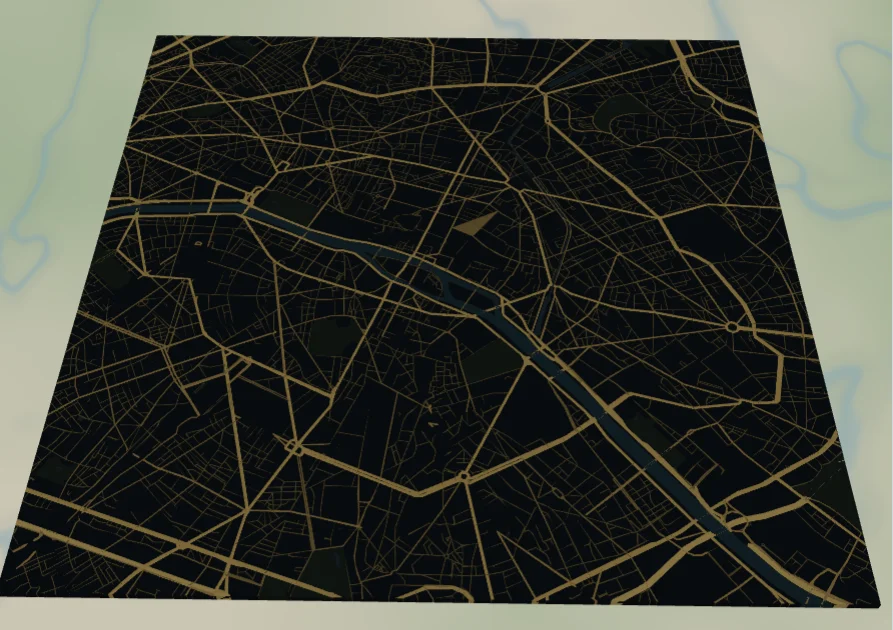
Where neon maps shout, this one glows. The Midnight Gold Map draws Paris on a near-black slate ground with every road in a warm metallic gold - thick on the grand boulevards, fine on the side streets - so the whole city reads as a delicate gilded web. The Seine and the parks sink back into the dark, leaving the road network to carry all the light.
Paris is an ideal subject: its radiating boulevards and star-shaped junctions turn the gold web into something that looks almost like jewellery. Any city with strong arterial roads works, but the more a city radiates from a centre, the more the gold catches the eye.
What You'll Need
UV print / sublimation
- The exported high-res PNG (4096 px)
- UV flatbed printer, or a sublimation setup with a dark coated blank (black aluminium, slate, dark hardboard)
- A metallic-gold ink or a gloss pass deepens the after-dark glow
Poster / paper print
- The exported high-res PNG sent to a photo lab that prints rich blacks
- A dark or brass frame to complete the premium mood
Laser (optional, plaque)
- A black-coated metal or acrylic plaque that engraves to a light or gold-tone core
- Any diode or CO2 laser, or a fibre laser for the cleanest gold-on-black
- Note: engrave the road network and let the plaque colour stand in for the gold
Step 1 - Start from the preset
Open the Midnight Gold Map preset. It opens on Paris at zoom 12.8 in a square (1:1) frame, centred so the radiating boulevards and the bend of the Seine fill the view. Pan so a strong junction or the river sits near the centre - that's where the gold web looks richest. Cities like Washington DC, Barcelona, or Vienna also shine here.
Step 2 - Tune the layers
The preset is a single layer group, "Midnight city", built from a dark base and a gold road hierarchy. The contrast between the two is everything:
- Land - Solid fill, deep slate
#11161D. The near-black night that makes the gold glow. Keep it dark; lifting it toward grey dulls the effect. - Water - Solid fill, dark teal
#16323B. The Seine reads as a subtle ribbon, just barely lighter than the land, so it shapes the frame without stealing light from the roads. - Park / landuse - Solid fill, near-black green
#19241D. Parks sink into the night as the faintest dark patches. - Motorway / primary - Solid fill, bright gold
#D4AF37(width 6) and#C9A227(width 4). The headline arteries that carry the glow. - Secondary / tertiary / streets - A dimming gold gradient from
#A98726down to#6E5B1E, so the fine mesh recedes while the main roads stay bright.
Keep every road in the gold family. If you want a different metal, shift the whole set together toward copper #B87333 or silver #C7CBD1 rather than recolouring one layer.
Step 3 - Export
- UV / sublimation: export the high-res PNG (4096 px). Keep the Background on so the slate base prints as a solid dark field. A metallic-gold ink or a gloss layer over the roads sells the glow.
- Poster: same high-res PNG, sized to your paper. Use a lab that prints deep, even blacks so the gold doesn't sit on a muddy ground.
- Laser (optional): export the per-layer SVG ZIP and engrave the road network onto a black-to-gold coated plaque; the line-width hierarchy carries the boulevard-to-street order.
Choose Your Build Method
UV print / sublimation
- Export the high-res PNG. Print onto a dark blank - black aluminium, slate, or dark hardboard - so the slate base and the substrate become one deep night.
- For sublimation, use a dark coated blank and press per its spec; metallic or pearl coatings make the gold roads shimmer.
- On a UV flatbed, lay the gold roads over the dark base directly; a spot-gloss or metallic pass on the road layer lifts the glow.
- A satin or gloss finish suits the after-dark mood better than flat matte.
Poster / paper print
- Send the high-res PNG to a photo lab that handles rich blacks - the gold only glows against a deep, even ground.
- Frame in dark wood or brass to lean into the premium, evening feel.
- Keep the square crop, or re-export in a portrait ratio for a tall, elegant framed piece.
Make It Yours
- Radial cities shine brightest: Paris, Washington DC, Barcelona, Vienna, Moscow - the star junctions become the focal point.
- Shift the whole road set to copper
#B87333for a warmer, more rose-gold feel, or to silver#C7CBD1for a cool platinum look. - Keep the base truly dark - go even deeper to near-black
#0B0E13for a higher-contrast, more dramatic glow. - Add the city name and coordinates in a thin gold serif under the map for an engraved-plaque elegance.
- Print large in a brass frame as a statement piece, or small as a set of dark coasters with gold streets.
- Turn the street mesh down for a bolder version that leans on the gold boulevards alone.
Keep up with MyLaserTools.
Email me about new tools, product updates, tutorials, and occasional MyLaserTools offers. Unsubscribe at any time.
© 2026 MyLaserTools.com. All rights reserved.